
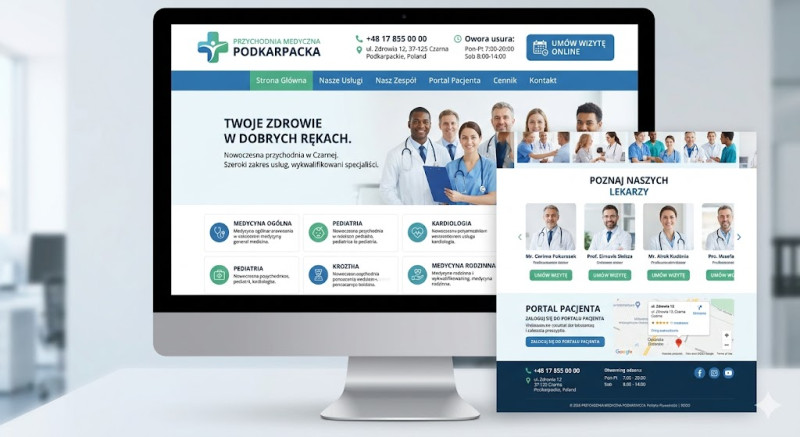
Creating a website for a medical clinic requires a design focused on trust, accessibility, and clarity. Patients visiting a medical website are often looking for quick, reliable information, so intuitive navigation and data security are paramount.
Here is a concise guide to building a successful medical clinic website (under 3000 characters):
1. Technical Foundation & Compliance
-
Platform: WordPress is the most popular choice due to its flexibility and medical theme ecosystems. However, custom development might be necessary for larger clinics to ensure maximum security.
-
Data Security & Privacy: Since you handle sensitive user data, an SSL certificate (HTTPS) is mandatory. Furthermore, the site must comply with strict privacy laws, such as GDPR in Europe or HIPAA in the US, especially concerning contact forms and patient data.
-
Accessibility (WCAG): Medical sites serve diverse age groups and people with disabilities. Ensure clean typography, high text contrast, scalable fonts, and compatibility with screen readers.
2. Core Features (The Patient Checklist)
-
Online Appointment Booking: Integrate a secure booking system (e.g., Zocdoc, Doctor365, or dedicated clinic software widgets). Patients should be able to select a specialty, a doctor, and an open time slot.
-
Doctor Profiles: Create a dedicated "Our Team" section. Each doctor should have a professional photo, a bio, specialized areas of expertise, languages spoken, and their medical credentials to build immediate trust.
-
Services & Specialties: Clearly list all medical departments (e.g., Pediatrics, Cardiology, General Medicine). Include pricing for private services or clear information about public health insurance coverage.
-
Patient Portal Access: Provide a distinct, secure login button leading to the external Electronic Health Record (EHR) system where patients can view lab results or request prescription refills.
3. Essential Content & Local SEO
-
Immediate Contact Details: Your phone number, full address, and a prominent "Emergency Info" section should be at the very top of the homepage.
-
Google Maps Integration: Embed a map with a pinpoint location and add instructions regarding parking or public transport access.
-
FAQ Section: Reduce the load on your reception desk by answering common questions online (e.g., "How do I prepare for a blood test?", "What should I bring to my first visit?").
-
Local SEO: Optimize for terms like "Medical clinic near me" or "GP doctor in [City Name]".
Summary Cost & Launch Checklist:
-
Domain, Hosting & Premium SSL: $150–$400/year (Opt for secure, compliant medical-grade hosting).
-
Booking/EHR Integration: Costs vary depending on your medical software vendor ($30–$150+/month).
-
Development: $2,500–$7,000+ due to advanced security protocols and necessary compliance checks.
Golden Rule: Keep the tone empathetic and professional. Use a clean color scheme (such as calming blues, greens, and whites) and ensure the mobile version is lightning-fast, as many patients search for medical help on their phones during urgent situations.