
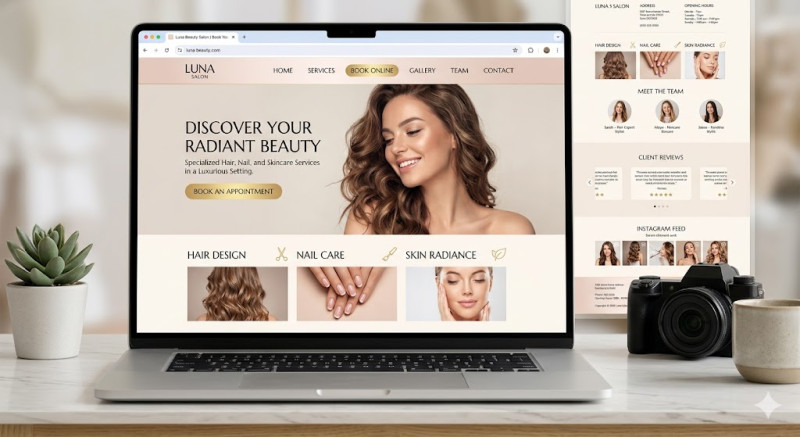
Creating a website for a beauty salon requires an elegant, clean, and highly visual design. In the beauty industry, your website is the digital storefront—it must reflect the luxury, pampering, and professionalism that clients will experience in person.
Here is a concise guide to building a successful beauty salon website (under 3000 characters):
1. Platform & Technical Setup
-
Platform: WordPress + Elementor is excellent for complete design control. Squarespace or Wix are also fantastic alternatives for beauty salons due to their stunning, visually-driven templates and built-in booking features.
-
Mobile-First approach: Most clients book appointments on the go using their smartphones. A seamless mobile interface is non-negotiable.
2. Essential Features (The Core Structure)
-
24/7 Online Booking System: This is the most critical feature. Integrate tools like Treatwell, Fresha, Mindbody, or Acuity Scheduling. Clients should be able to pick a service, choose a stylist/beautician, and select a time slot in under a minute.
-
Clear Service Menu & Pricing: Group your services logically (e.g., Hair, Nails, Skincare, Massages). Include exact prices, duration of the treatment, and a brief explanation of what the service includes.
-
"Meet the Team" Section: Beauty treatments are highly personal. Showing professional photos of your staff along with their specialties builds comfort and trust before the client even walks through the door.
3. Visuals and Social Proof
-
High-End Gallery / Portfolio: Display high-quality, bright photos of your actual salon interior and "Before & After" results (with client permission).
-
Instagram Feed Integration: The beauty industry thrives on social media. A live widget showing your latest Instagram posts keeps your website fresh and showcases your most recent work automatically.
-
Client Reviews: Feature glowing testimonials directly on the homepage. Link your Google My Business or Facebook reviews to prove authenticity.
4. Local SEO & Contact Info
-
Local Search Optimization: Optimize your copy for local keywords (e.g., "Best lash lift in [City Name]", "Balayage specialist near me").
-
Header & Footer Essentials: Your address, phone number, opening hours, and a "Book Now" button should be visible on every single page. Include an embedded Google Map so clients can easily find directions.
Summary Cost & Launch Checklist:
-
Domain & Hosting: $50–$150/year.
-
Booking Software: Free basic tiers are available (like Fresha), or $20–$50/month for premium platforms with automated SMS appointment reminders.
-
Development: $1,500–$4,000 if hiring a professional designer, or nearly free if using a website builder theme yourself.
Golden Rule: Keep the aesthetic minimal and sophisticated. Use a cohesive color palette (like pastels, neutrals, or classic black and white) and high-quality typography. If your website looks chaotic or outdated, potential clients will assume your beauty services are too.