
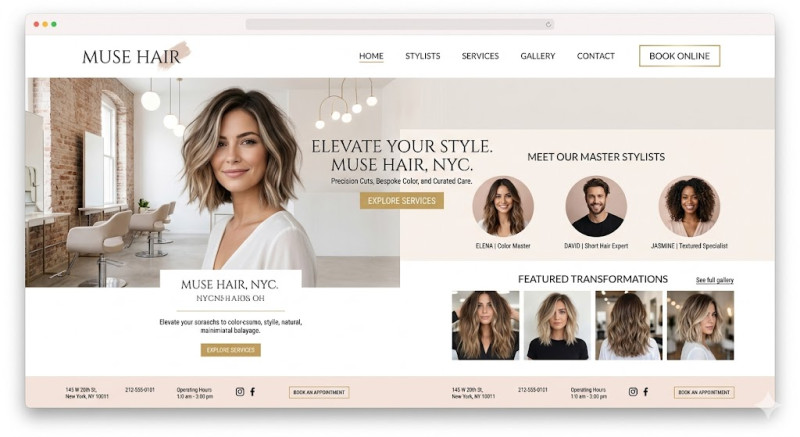
1. Platform & Mobile Setup
-
Platform: WordPress (with Elementor), Squarespace, or Wix are the best choices. They offer beautiful, image-focused templates that are perfect for the beauty industry.
-
Mobile-First Design: Over 80% of clients book hair appointments via their smartphones. Ensure your site loads in under 2 seconds and has an effortless mobile layout.
2. Core Features (The Client Essentials)
-
24/7 Online Booking Integration: This is your most important feature. Connect your site to industry-standard booking software like Fresha, Treatwell, Booksy, or Acuity. Place a prominent "Book Now" button in the header so it is visible on every page.
-
Service Menu with Transparent Pricing: Categorize your services logically: Haircuts & Styling, Hair Coloring (Balayage, Highlights), Treatments (Keratin, Olaplex), and Extensions. Always include starting prices and estimated durations for each service.
-
"Meet the Stylists" Section: Hair styling is incredibly personal. Feature high-quality photos of your team with short bios highlighting their specialties (e.g., "Color Master" or "Short Hair Expert"). This helps new clients choose the right professional.
3. Visuals and Social Proof
-
Live Instagram Feed: The hair industry thrives on visual results. Instead of constantly uploading new photos to your site, embed a live Instagram widget showcasing your latest "Before & After" transformations.
-
Authentic Gallery: Include high-resolution photos of your salon's interior. A clean, modern, and welcoming space attracts premium clients.
-
Google/Facebook Reviews: Display real testimonials on your homepage. Positive feedback about great customer service and coloring expertise builds immediate trust.
4. Local SEO & Contact Information
-
Local Keywords: Optimize your website for local search terms (e.g., "Best hair salon in [City/Neighborhood Name]", "Balayage specialist near me").
-
Footer Essentials: Your address, phone number, opening hours, and an embedded Google Map should be easily accessible. Clearly state your cancellation policy near the booking links to avoid no-shows.
Budget & Launch Checklist:
-
Domain & Hosting: $50–$150/year.
-
Booking System: Free tiers are available (e.g., Fresha), while premium setups with automated SMS reminders cost $20–$50/month.
-
Development: $1,500–$3,500 if hiring a professional freelancer, or nearly free if you use a pre-made template yourself.
The Golden Rule: Keep the aesthetic minimal, clean, and elegant. Use a cohesive color palette (like monochrome, neutrals, or soft pastels) and chic typography. If your website looks messy or outdated, potential clients will assume your haircuts look the same way.