
Step 1: High-Performance Hosting
Games mean high-definition video trailers, massive art galleries, and sudden traffic spikes after a trailer drop or a popular influencer stream.
-
Domain: Keep it short, using a classic
.comor industry-specific extensions like.games,.studio, or.io. -
Hosting: Avoid cheap shared hosting. Opt for managed WordPress hosting with NVMe SSDs and integrate a CDN (like Cloudflare). This ensures your heavy video loops and concept arts load instantly for players and publishers worldwide.
Step 2: Visual Style – Embrace Dark Mode
In the gaming industry, Dark Mode is the absolute standard. A dark background makes the vibrant, saturated colors of your game screenshots pop and gives the site a cinematic, premium feel.
-
Tools: Use Elementor Pro for full control over entry animations and video backgrounds, or choose dedicated themes like Eldritch or Plax from ThemeForest, which come pre-packed with gaming layouts and Twitch/YouTube integrations.
Step 3: Crucial Website Structure
Your studio’s website must successfully serve three distinct audiences: players, publishers/investors, and job applicants.
-
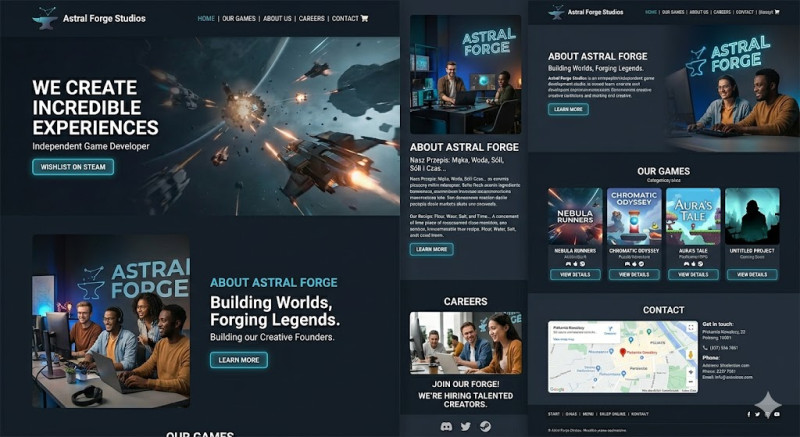
Hero Section: Ditch static images. The very top of your homepage should feature a seamlessly looping, muted video of your best gameplay or cinematic render. Overlay it with your logo and a giant Call to Action (CTA) button, such as "Wishlist on Steam".
-
Games Portfolio: Each project needs a dedicated landing page. Include the official trailer, a high-res screenshot gallery, platform icons (PC, Consoles), system requirements, and direct store links.
-
About Us: Showcase key team members (Founders, Directors) with professional yet approachable photos. Publishers invest in talented people, not just raw ideas.
-
Careers: Gamedev studios are almost always scouting for talent. Create a page detailing your company culture, perks, and a clean list of open positions (3D artists, programmers, animators).
-
Presskit: Create a
/presskitpage with a downloadable.zipfile containing high-res transparent logos, clean screenshots (without UI), and a studio fact sheet. Journalists and influencers expect this to be easily accessible.
Step 4: Smart Media and Plugins
-
Preloader (e.g., LoftLoader): Heavy media sites take a second to load. A custom animated loading screen (like a spinning studio logo) keeps users engaged.
-
WP Job Manager: A lightweight plugin to effortlessly list and manage job openings.
-
Video Optimization: Never upload raw
.mp4videos directly to your WordPress media library—it will crush your server. Embed them from YouTube/Vimeo or use a streaming service like Bunny.net Stream for background loops.
Step 5: Community Gateway
A game is nothing without its community. Your website must act as a bridge to your social channels. Place highly visible, custom-styled icons for Discord, X (Twitter), TikTok, and Steam. Also, integrate a Newsletter signup form—a direct email list of passionate players is your most valuable marketing asset for future releases.